Best for contributors who need the keyword count and first positions to stay inside Shutterstock expectations.
Shutterstock
Shutterstock Keywording Tool
Use the Shutterstock keyword tool to generate 7-50 relevance-ordered keywords with a fast preview, spam checks, and editable output.
New users receive 10 free credits. Continue with monthly credit plans or non-expiring one-time credits.
7-50 keyword range
Spam review before export
Free 24h preview
30-second demo
30-second Shutterstock demo
Generate a relevance-ordered keyword list within the 7-50 range.
30-second demo
Drop in a preview
Detect subject and style
Rank keywords by relevance
Export the final list
Live outputDefault metadata
Drag and drop an image here, or click to browse.
Upload one image for the secure demo.Sign in for 10 free credits, then continue with Stocktag-managed AI throughout the workflow.
Keyword range compliance
Keyword range compliance
Generate keyword sets that respect the 7-50 range while keeping strongest terms first for search visibility. This page is built for Shutterstock keyword tool and Shutterstock keyword generator searches.
Minimum7
Maximum50
Current30
Range statusWithin range
Best fit
Who this page fits best
Use the route that matches the user intent, then pass serious workflow needs into the full metadata product.
Useful when the real work is cutting weak tags without losing strong subject terms.
Stronger when you want Shutterstock compliance guidance separated from Adobe ranking logic.
Sample output
Preview a real metadata set
Review the output structure before exporting or editing.
Metadata snapshot
30 keywords generated (within 7-50 range)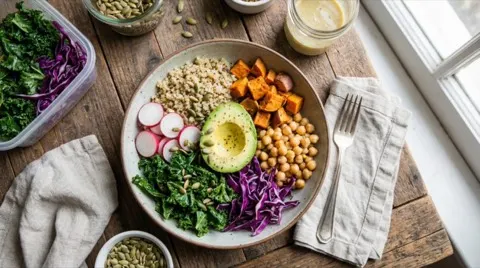
TitleColorful Vegan Buddha Bowl With Avocado Chickpeas And Roasted Sweet Potato
DescriptionHealthy plant-based bowl with avocado, chickpeas, roasted sweet potato, kale, radish, quinoa, and purple cabbage styled on a wooden table in natural window light.
Keywords
vegan buddha bowlhealthy mealavocadochickpeasroasted sweet potatoquinoakalepurple cabbageradishplant basedcolorful foodlunch bowlclean eatingvegetarianfresh ingredientswellnessbalanced dietwooden tablenatural lightfood stylingmeal prepwhole foodsorganicbowl mealnutritionsuperfoodhealthy lifestylefork and napkinwindow lightappetizing
- Relevance scoring helps you trim to the final count.
CSV preview
Ready to exportfilename,title,description,keywords Ultrarealistic_stock_photo_2k_202602051703_2.webp,Colorful Vegan Buddha Bowl With Avocado Chickpeas And Roasted Sweet Potato,"Healthy plant-based bowl with avocado, chickpeas, roasted sweet potato, kale, radish, quinoa, and purple cabbage styled on a wooden table in natural window light.",vegan buddha bowl; healthy meal; avocado; chickpeas; roasted sweet potato; quinoa; kale; purple cabbage; radish; plant based; colorful food; lunch bowl; clean eating; vegetarian; fresh ingredients; wellness; balanced diet; wooden table; natural light; food styling; meal prep; whole foods; organic; bowl meal; nutrition; superfood; healthy lifestyle; fork and napkin; window light; appetizing
Relevance snapshot
vegan buddha bowl98%
healthy meal94%
avocado91%
chickpeas88%
roasted sweet potato86%
Search intent
Stay inside Shutterstock keyword rules
Generate keyword sets that respect the 7-50 range while keeping strongest terms first for search visibility. This page is built for Shutterstock keyword tool and Shutterstock keyword generator searches.
Balance keyword count, relevance, and spam risk
Shutterstock allows 7-50 keywords, but quality matters more than volume. This tool prioritizes the terms most likely to match buyer search intent.
Use relevance ordering to keep your first keywords focused on subject, commercial use case, and clear context, then remove repetitive or unsupported variants before export.
- Keep the first keywords tightly aligned with the image
- Avoid repetitive stems and low-value variants
- Trim to your final count without losing ranking signals
From guest preview to account conversion
Visitors get one secure live run every 24 hours to test output quality before creating an account.
After signup, you can run unlimited metadata workflows, batch exports, and Shutterstock-focused optimization. When the query shifts from drafting keywords to tracking Shutterstock keyword trends, move into Market Intelligence.
- Review weak or spammy keywords before export
- Keep the final set inside the 7-50 range
- Use batch export once the workflow is stable
FAQ
Answers to common questions
Quick details before you try the demo.
Can I use this as a free Shutterstock keyword generator?
Yes. You can run one secure guest preview every 24 hours, check the keyword order, and then continue into the full workflow after signup.
How many keywords should I submit?
The tool generates a 7-50 keyword range and lets you trim to your target count.
Is the list ordered by relevance?
Yes. Keywords are ordered so the most relevant terms appear first.
Can I edit the list before export?
Yes. Review and adjust the keywords before exporting to your Shutterstock workflow.
Do I need an account to preview?
No. You can run one secure 30-second guest demo every 24 hours before creating an account.
Where do I check Shutterstock keyword trends?
Use Market Intelligence when you want broader Shutterstock keyword trends and seasonal planning. This page focuses on drafting and reviewing the keyword set itself.
Can I remove spammy keywords before export?
Yes. Review-before-export is essential on this page. Remove repetitive stems, low-value variants, and unsupported terms before you finalize the 7-50 keyword set.
Start with 10 free credits
Sign in to generate, edit, review, and export metadata with Stocktag-managed AI.
